The Autohive LinkedIn integration connects your LinkedIn profile with Autohive’s automation platform, enabling:
- Content sharing - Post text, images, articles, and reshares to your LinkedIn feed
- Post management - Update or delete posts you already published
- Profile access - Retrieve your LinkedIn profile information and basic professional details
Install the integration
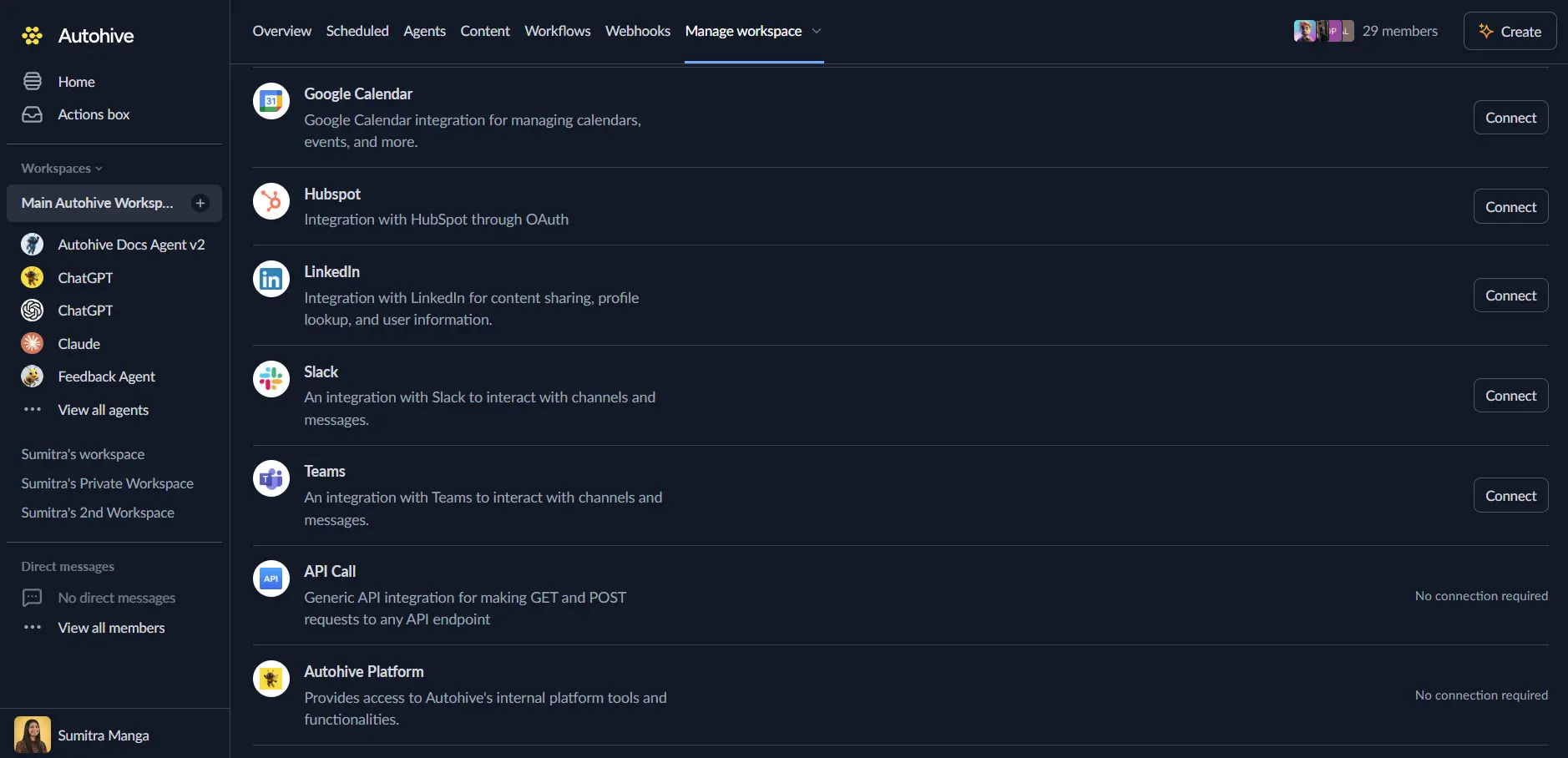
Log in to Autohive and navigate to Your user profile > Connections or Your workspace -> Manage workspace
Locate the LinkedIn Integration card and click Connect
Select your LinkedIn account and click Choose Account
Review and approve permissions. Autohive requests access to:
Ensure you approve the permissions required in order for the integration to function as expected.
Confirm installation - you’ll be redirected to Autohive with “Connected” status displayed
Use the integration
You can now use the integration with your agents, workflows and scheduled tasks!
- Follow our Create your first agent guide on how to create an agent.
- Turn on LinkedIn capabilities in Agent settings → Add capabilities. You can turn individual actions on or off.
- Once the settings have been selected, begin prompting the agent of the workflow you’d like to achieve with Autohive and LinkedIn!
Available capabilities
Profile
- Get user info — Get the signed-in user’s LinkedIn profile.
- Returns name, email, profile picture, and locale.
- Uses OpenID Connect, a standard sign-in method that shares basic profile data.
Posts
- Create post — Publish a post to LinkedIn, with or without images.
- Add one image, up to 20 images, or no images for a text-only post.
- Choose PUBLIC or CONNECTIONS visibility.
- Post as yourself or as another authorized LinkedIn user.
- Optionally block others from resharing the post.
- Share article — Post a link with your own commentary, a title, and a description.
- Reshare post — Reshare an existing public LinkedIn post with optional commentary.
- The source post must be public and allow reshares, or LinkedIn rejects the request.
- Update post — Change the text of a post you already published.
- Delete post — Remove a post you already published.
Key features
Post creation and management
- Text-only, single-image, and multi-image posts, up to 20 images per post
- Article posts with a link, title, and description
- Reshares of public posts with your own added commentary
- Edit or delete a post after you publish it, without deleting and reposting
Profile access
- Retrieve your LinkedIn profile through OpenID Connect
- Confirm your identity before the agent posts on your behalf
LinkedIn API integration
- Uses LinkedIn’s Posts API, version 202601
- Secure OAuth 2.0 authentication through Autohive’s platform connection
Common use cases
Automated professional updates
- Post achievements, milestones, and project announcements
- Share short industry insights and commentary
- Keep up a regular posting schedule for visibility
Workflow-based content sharing
- Post content an earlier workflow step generated
- Share links to articles, guides, or press releases
- Reshare relevant posts from your network with added commentary
Post lifecycle management
- Fix a typo or update wording without deleting and reposting
- Remove outdated or incorrect posts as part of a workflow
Personalize with profile data
- Use profile details to personalize automated content
- Check you have the right person before posting on their behalf
Content best practices
Professional standards
- Keep a professional tone and industry-appropriate content
- Follow LinkedIn’s community guidelines and content policies
- Balance automation with authentic, personal engagement
Content strategy
- Mix automated updates with personal insights
- Share industry news, trends, and expert commentary
- Test automated content before you add it to a live workflow
Posting considerations
- Post during professional hours for better engagement
- Keep content concise and relevant
- Avoid over-posting to your network
LinkedIn integration limits
API restrictions
- LinkedIn’s API rate limits apply to every request
- Posts can include up to 20 images
- Comments and reactions are not supported. LinkedIn requires a separate approval this integration does not have
Reshare restrictions
- LinkedIn blocks reshares of connections-only posts, and posts where the author turned reshares off
- LinkedIn blocks reshares of connections-only posts, and posts where the author turned reshares off. Pick a different public, reshare-enabled post if this happens.
- If a reshare fails with a “403 Forbidden” error after a permission change, reconnect your LinkedIn account.
Disconnect the integration
Important: Disconnecting stops data synchronization but preserves existing data in both systems.
- Navigate to Your user profile -> Connections or Your workspace -> Manage workspace
- Find the LinkedIn Integration
- Click Disconnect and confirm
Data Impact: Existing data remains unchanged in both systems, but sync stops and Autohive loses LinkedIn API access.
Uninstall the app
From LinkedIn: Go to your LinkedIn settings > Privacy > How LinkedIn uses your data > Manage your data and personalization > Find Autohive and remove access